LH/RH Layouts
When To Use This Page
Use this page for an advanced paired-layout case where one layout covers a matched left-hand and right-hand part pair that must stay aligned. This is most useful for the Projects User, Projects Manager, Purchase Manager, and MR Coordinator when they need to move one paired layout through the normal approval and release flow without splitting the work into separate records too early.
Before You Begin
Before starting, confirm that the layout really represents a left-hand and right-hand pair that should stay together as one controlled layout flow. This page is not for ordinary single-part layouts. Users should treat the pair as one layout for drafting, review, approval, and release.
If the layout is still moving through review, expect it to follow the normal workflow:
Draft -> Submitted for Check -> PM Approved -> Approved by Purchase -> Released
Steps
- Build and review the LH/RH pair as one layout.
Keep both sides together in the same controlled flow so everyone reviews the same version at the same time. This helps the team avoid approving one side while accidentally working from an older or incomplete version of the other side.
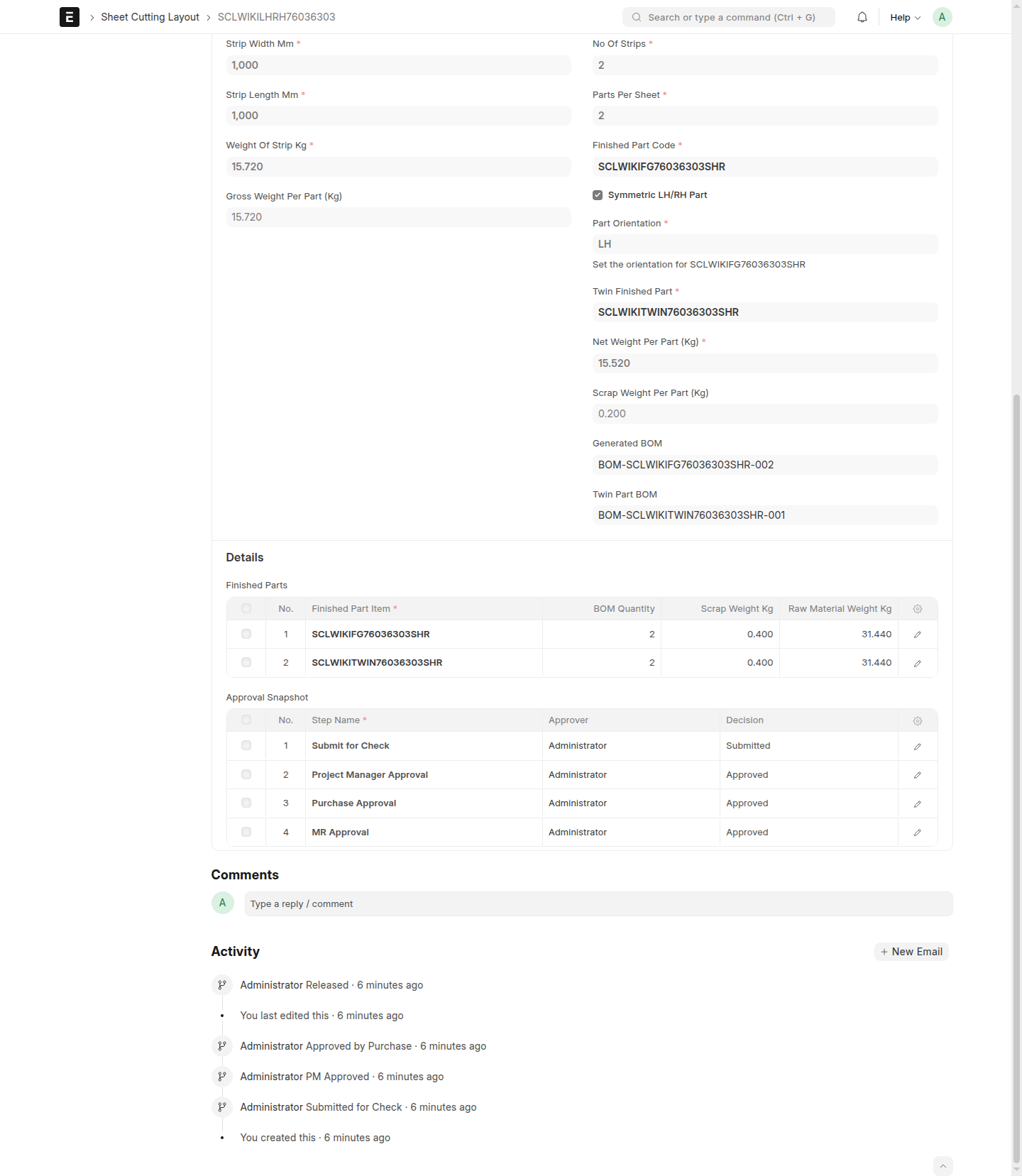
While preparing the pair, confirm that the user-facing fields Symmetric LH/RH Part, Part Orientation, and Twin Finished Part are filled in clearly and match what the team expects to release together. In practical terms, users should be able to tell which side they are looking at, how that side is identified, and which finished part is its matching pair.
- Move the layout through the standard approval actions.
The Projects User uses Submit for Check, the Projects Manager uses Project Manager Approves, the Purchase Manager uses Purchase Approves, and the MR Coordinator uses MR Release when the pair is ready for final release.
- Confirm that the layout becomes
Released.
After MR Release, check that the layout status changes to Released. This shows the LH/RH pair is now the active approved layout that downstream users should follow.
- Review the finished-part BOM references after release.
A released LH/RH layout produces separate finished-part BOM references for the two sides. After release, review the layout carefully and look for the separate BOM references tied to the left-hand and right-hand finished parts. Users should recognize that these are separate references even though the pair was controlled as one layout flow.
- Make sure downstream users are working from the correct side-specific references.
When sharing the released result, point users to the correct finished-part BOM reference for each side so purchasing, planning, and related follow-up work stay aligned with the intended LH or RH part.
What Happens Next
Once the LH/RH layout is Released, the pair remains one approved layout record, but users should expect separate finished-part BOM references for the two sides. Those references help users identify the correct released result for each finished part while still preserving the paired layout history in one place.
If a released LH/RH layout needs a change later, do not change it in place. Use New Version so the next revision can be reviewed and released in a controlled way.
Common Mistakes
- Treating LH and RH as two unrelated layout flows when they are meant to stay paired.
- Releasing the layout without checking that it actually became
Released. - Looking for only one finished-part BOM reference after release instead of recognizing the separate references for the left-hand and right-hand sides.
- Sharing the wrong side-specific reference with downstream users.
- Editing expectations on a released pair instead of starting a new controlled revision with
New Version.
Screenshots
Use the screenshots to confirm that the LH/RH pair is being handled as one layout through approval and release, and then to confirm that the released result shows separate finished-part BOM references for the two sides. The most important visual checkpoints are the paired layout before release, the Released status, and the separate side-specific references visible after release.
- A paired LH/RH layout in
Draft - The workflow actions
Submit for Check,Project Manager Approves,Purchase Approves, andMR Release - A paired layout in
Released - A released LH/RH layout showing separate finished-part BOM references for both sides