Export and Download
When To Use This Page
Use this page when you need to download a layout workbook for review, sharing, printing, or follow-up use outside the layout screen. This is useful for any end user, but it is especially important when teams need to make sure they are working from the correct approved version.
Before You Begin
Before downloading, confirm that you are on the correct layout and the correct version. If you need the final approved record, prefer downloading from the layout that is already Released.
If more than one version exists, slow down and verify whether the current record is Draft, Submitted for Check, PM Approved, Approved by Purchase, Released, or Superseded. This prevents users from sharing or printing the wrong version.
Steps
- Open the layout you want to export.
Make sure it is the exact layout record you intend to share or print. When the workbook is meant to represent the final approved result, prefer the version that is already Released.
- Confirm that you are using the right version for the purpose.
A draft may be useful for internal review, but a final handoff should usually come from the Released layout. If an older record is Superseded, do not treat that workbook as the current approved version.
- Download the workbook from the layout.
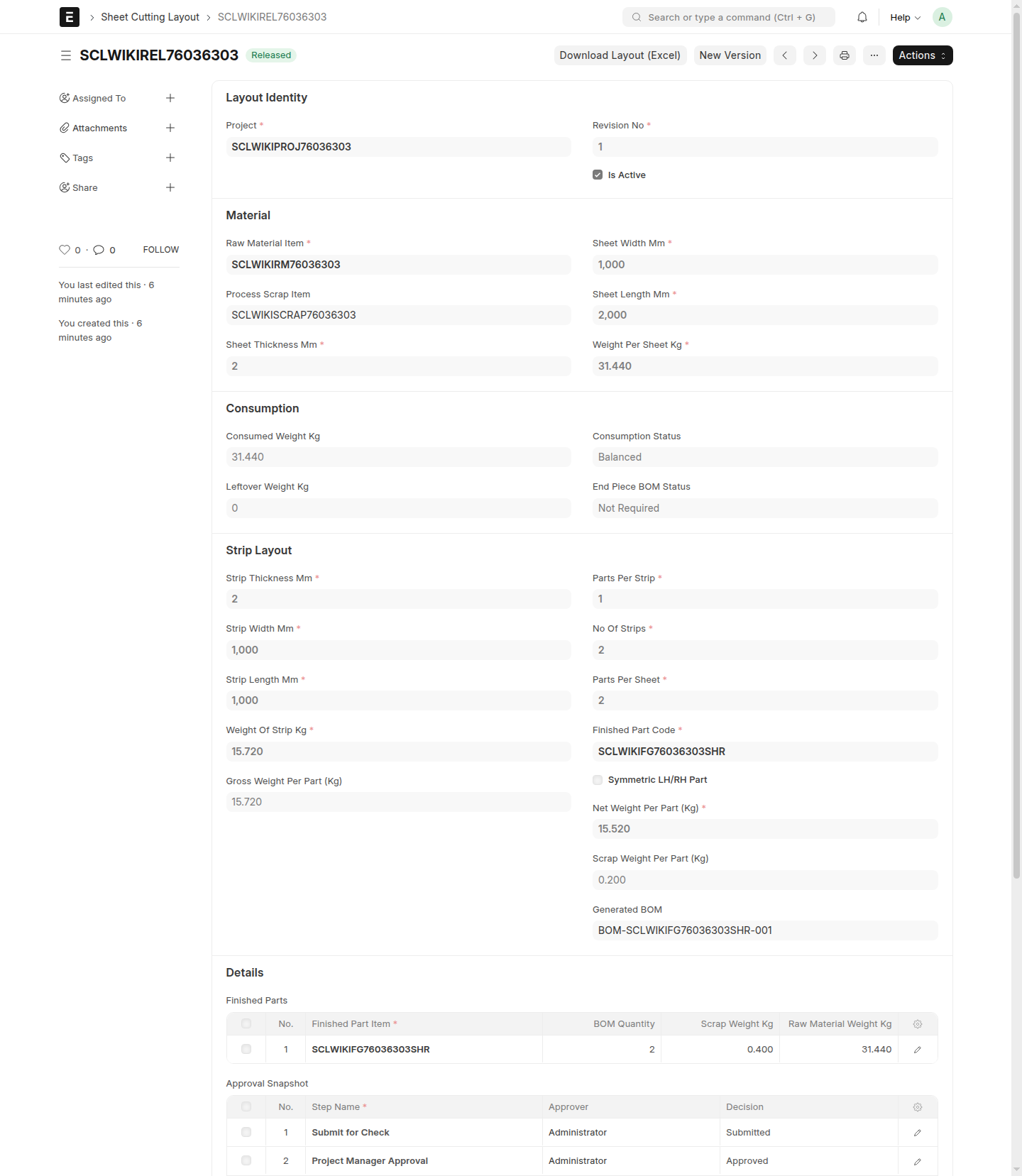
Use Download Layout (Excel) from the layout you already have open. That action gives you the practical workbook output for that layout version so you can review it outside the system, share it with other users, or print it when needed.
- Review the downloaded workbook before sending it on.
Check that the workbook matches the intended layout, version, and business context. Make sure the visible details are the ones the next user should actually rely on.
- Share or print only after the final check.
A quick review before sharing helps avoid version confusion, unnecessary rework, and downstream use of the wrong layout workbook.
What Happens Next
After download, users have the workbook for the selected layout version. That workbook can be used for review, communication, printing, or coordination with downstream users. If the workbook came from a Released layout, users can treat it as the final approved record for normal downstream use.
If you later discover that the wrong version was downloaded, return to the layout list, identify the correct record, and download again from that version.
Common Mistakes
- Downloading from the first matching layout without checking the version.
- Sharing a workbook from
Draftwhen the team actually needs theReleasedrecord. - Using a workbook from a
Supersededlayout as if it were current. - Printing or sharing the workbook without doing a quick final review.
- Assuming every downloaded workbook represents the final approved layout.
Screenshots
Use the screenshots to confirm that you are exporting from the correct version before download and to check the workbook before it is shared or printed. The main visual checkpoints are the layout status, especially Released or Superseded, the Download Layout (Excel) action, and the final workbook review before it leaves your hands.
- A layout in
Released - A layout in
Superseded - The
Download Layout (Excel)action - A downloaded workbook being reviewed before sharing or printing